How each sale splits
From the price you set, three things come out:
- Merch.link fee: 20% of the price
- Printing: what our print partner charges for the product and size
- Card processing: the card fee for the order
What's left is your profit. Buyers also pay shipping and any sales tax, which aren't part of your price.
How much should I charge?
When you design merch, the price selector shows your exact breakdown before you publish. Prices go up to $50.00, and you can't set a price that leaves less than $1.00 profit.
Using the price selector
In the generator, Total Price is where you set your price. It covers sizes XS to XL; type an amount or drag the slider. Underneath, the breakdown shows, for one shirt sold:
| Line | What it is | |---|---| | Your price | What buyers pay | | Merch.link fee | Our share of the price (your store's rate) | | Printing (est.) | The shirt, the print and our print partner's order fee, in the colour you picked | | Processing (est.) | The card fee | | Your Profit | What's left for you |
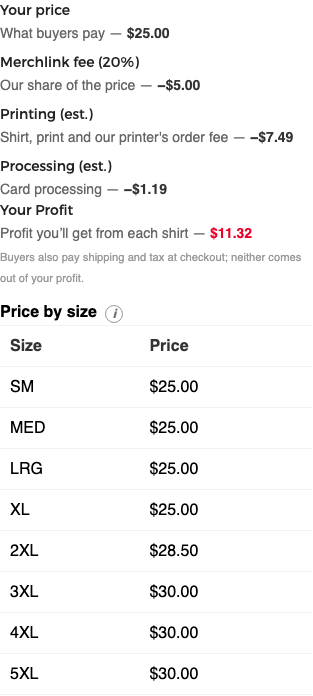
Printing and processing are estimates: the real costs are worked out when an order comes in, and your profit is never less than $0.
- New merch starts at our suggested price for the shirt. You can't go below the minimum, which leaves you at least $1.00, or above $50.00. The minimum depends on the shirt and colour.
- Price by size lists what buyers pay for each size. 2XL and up cost more to print, so they add exactly enough that you keep the same profit on every size.
- Donated merch shows what each sale raises for the benefit store; if the designer chose to split proceeds, it shows each half.
- If your store has a fee credit, the selector shows how much is left. See fee credits.
Can the fee change?
We'll email you before any change to your store's rate. Your prices stay the same, and past orders never change.
See pricing & fees for a worked example.
Still need help?
Contact us